Showing posts with label lion. Show all posts

Wednesday, September 24, 2014

Beta 24

Solitaire Till Dawn BETA 24 is now available from our Beta Program page.

Crashes and Freezes—Please Read!

For the past few months Solitaire Till Dawn has mostly seemed solid and stable, with one big exception: every so often, somebody will experience an unexpected crash in the middle of playing an otherwise-ordinary game. I know from your detailed reports (thank you!) that this is a real problem; but I've been seriously hampered by the fact that I have never seen this crash on my own systems.

Some of you have told me that you can reliably produce the crash by some procedure on one of your systems, but every person who has told me this has a different way of making it happen! And no matter how carefully I reproduce your setup and follow your instructions, the crash never happens on my own machines. This all makes it very difficult for me to figure out what's wrong, and impossible for me to be certain (from my own testing) to know if any change I make has helped.

But I have been working on it anyway, and I may have made some progress. This b24 release contains some changes that I believe fix a real problem, one that might result in the kind of crashes and freezes that some of you have seen. But I can't know for sure until you folks have run it through its paces. So:

If you've seen crashes or freezes recently, please try to make them happen with b24. If you find that you no longer see the problem, please let me know! And of course, if you do experience new crashes, please send me the crash report as usual. This is the last important bug to fix before we can ship the product! I really want this fixed, and you can help.

Other Changes in b24

Rank Highlighting: Press (for example) 'j' to highlight all the Jacks; if you then move a Jack, the highlighting on that Jack would disappear, although all other Jacks would remain highlighted. In b24, the moved card retains its highlighting.

Game List Scrolling is improved, especially on Lion and Snow Leopard where it has been very jerky and flickery.

The Game Info Panel now always appears (after the usual half-second delay) whenever the selected game is visible in the game list.

Play Game Number: This dialog did not work under Snow Leopard; now it does.

Rouge et Noir: The 'Deal' command will now move a card from the stock to the discard pile, if the stock is not empty. If the stock is empty, dealing will recycle the discards as before.

Beta Notice: In the panel that appears at startup to show the expiration date, there is now a button labeled "Check for Updates". Clicking that button will open the Beta Program page on this web site, where you can see whether a later beta version is available, and download it if so. This feature is a bit late in coming, since we are hoping that we are nearly done with the beta program! But we have promised to keep a usable beta available to you all until the final product is available from the App Store, and until then this button should be helpful.

Why It's Difficult


Just for fun: Today's XKCD comic doesn't really explain why some of the things you'd like me to do are difficult, but it at least recognizes the problem:
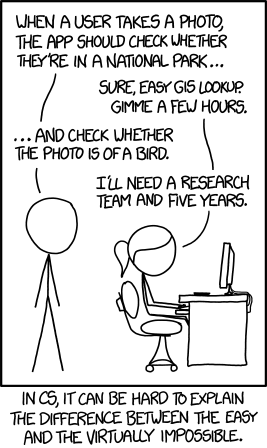
comic

Tuesday, March 4, 2014

Beta 13 Progress

In my last post, I said that I wanted to delay releasing beta 13 until it felt really solid and stable: that is, I want it to really work again. It was working well before I rewrote all the animation code; I want to get back to that point.

And I'm close, now. I believe I've got all of b12's nasty crashing bugs fixed (although I'm still testing to try to be more certain). I have the big face-down-cards bug that Lion users have been seeing pretty much fixed, too. And I have been working hard on putting more polish on the animations, especially the timing so that everything will seem to move smoothly, neither too fast nor too slow.

Before I send a beta out to all of you, I usually try to test it myself. The last couple of betas didn't get much testing, for reasons I won't rehash, and the result is what you've seen: lots of serious bugs that I should have found and fixed before you ever saw them. For b13, I have time to be much more careful about my testing, and that is what I'm working on now.

But testing takes time. You are running systems that vary all the way from Snow Leopard to Mavericks: that covers four different major releases of the Mac OS. Solitaire Till Dawn behaves differently on every one of them. So multiply 100 games times 4 Mac OS versions times several plays per game, and you can get a sense of how much testing I have to do to even pretend that I'm being thorough.

I had hoped to get b13 out very soon, perhaps even this evening; it has been running very well on my Mountain Lion system that I use for development. I had hoped that it would run equally well on Lion and Mavericks, but I am testing first to make sure. And guess what: I've found bugs that show up in Lion but not in Mountain Lion or Mavericks, and I've found bugs that show up in Mavericks but not in Mountain Lion or Snow Leopard!

I found those bugs just a little while ago, today. I will spend tomorrow working on them and see what kind of progress I can make. They aren't killer bugs: mainly they are fairly rare occasions when cards show up face down instead of face up like they should. I know I said I had that one fixed, and I mostly have: the bug is now rare instead of common. But "rare" isn't good enough, of course. With a little luck I can get them fixed in just a day or two. If I can't, I will put out b13 anyway, since it is a huge improvement over b12; so either way you won't have to wait too long.

In the meantime, please don't send me any more bug reports about b12. I already know it's very buggy and crashy. I already have far more crash reports than I need or can use. Wait for the next beta, please, and then you can start sending me reports again. Right now they'd just be wasting your time and mine. Thanks!

A quick word about Snow Leopard (Mac OS X 10.6): beta 13, like beta 12, will have serious problems on Snow Leopard. I know about them, I intend to fix them, but not in this release. Maintaining compatibility with Snow Leopard is quite difficult, and most of you aren't using it. I need to get a stable release out for the majority, and I need to do it fairly quickly, so Snow Leopard will have to wait.

Friday, February 28, 2014

Beta 12: Face Down Cards

As far too many of you have already seen, on Lion (Mac OS 10.7) many games in b12 show face down cards where there should be face up cards.

Update: I've found and fixed this. The fix will appear in the next release, b13. (I know that many of you would like me to instantly release a fixed version, but I still have other, very serious crashing bugs to investigate. I would like to get those solved for the next release as well. Please be patient while I work on this.)

Crashes and Freezes
Many of you are also discovering and reporting a bug that I did already know about, and which is called out in the b12 Read Me file, in recent blog posts here, and on the Bug List page: Crashes can occur when you use Undo, Redo, or Deal (clicking on the deck). On my systems this happens rarely, but it does happen. On some of your systems it clearly happens quite easily.

Please don't send me any more bug reports about this. I usually don't ask that, but I am getting so many that I don't have time to work on the problem: all my time is going to answering the reports.

Fixing these crashes is now my highest priority.

Sunday, January 5, 2014

Beta 4: Montana and Addiction, and "No game window"

Solitaire Till Dawn BETA 4 is now available for download from our Beta Program page.

This release fixes the following bugs:

Bug ID 3: No game window opens at launch.
We now believe that this is due to a corrupted auto-saved game file in Solitaire Till Dawn's preferences folder. We also believe that the corruption was caused by the b1 release, which had incompatibilities with OS X 10.7 (Lion). If we are correct, it won't happen again because we fixed the incompatibility in the b2 release. However, the corrupted files remained behind, and still caused problems in b2 and b3. Some of you followed our advice and removed your Solitaire Till Dawn prefs folder to get rid of the corrupted file. For the rest of you, the b4 release now checks the validity of the auto-saved game file, and if it is not successfully read in, it is ignored and a new game is started instead.

Bug ID 12: Selecting a larger card size sometimes doesn't work.
Actually we can't really fix this one. Larger card sizes mean that the layout for the whole game takes up more space; but the whole game still has to fit in the window, and the window has to fit on your screen. If you request too large a card size, Solitaire Till Dawn won't honor your request because it would mean that the game wouldn't fit on your screen. But now, when this happens, Solitaire Till Dawn will at least put up a notice to explain why it couldn't comply with your request.

Bug ID 13: In Montana and Addiction, redeal can cause a crash.
This one surprised me, because I enjoy these games and played them a lot during development. I tracked the problem down to a recent code change that looked innocuous, but that turned out to be breaking those games. It's fixed now, and you should be able to play Montana and Addiction safely.

Let me take a moment to thank you all for your energy in testing Solitaire Till Dawn and in sending me your wonderful bug reports. You are all being hugely helpful, and I appreciate it! I'd like to ask you one more favor: if a bug bothered you in the past and a new beta fixes it, let me know. It helps me be sure that I have really fixed that bug.

Friday, January 3, 2014

Beta 2: Lion and Snow Leopard Compatibility

Solitaire Till Dawn BETA 2 is now available for download.

This release should fix the serious compatibility problems with OS X 10.6.8 (Snow Leopard) and 10.7 (Lion) that were seen in the b1 release. These were bugs ID 1 and 2 in our Bug List.

We also know more now about bug ID 3, where some users never see a game window, and instead only get a menu bar with nearly all of its menu items disabled. This is a conflict between Apple's "Gatekeeper" feature and software downloaded from the Internet instead of from the App Store. Update: The workaround that we originally suggested for this problem is not helping. Currently we have no solution, but it's our highest priority and we're working on it.

To get the b2 release, visit our Beta Page.

Saturday, September 28, 2013

A Little Atmosphere

Just a quick progress report: Since my last post, I've finished up the animation bug fixes I was working on, and I'm now doing a little decorating: think of it as turning Solitaire Till Dawn into a place with "a little atmosphere."

Much of this work has actually been done for a long time: selecting cardbacks, royalty images, and window backgrounds is all already working. But the user interface for the Decor window, where you can select these things, was clunky and hard to use. I spent some time on it, and I think it's better now.

By the way, there's one feature from old Solitaire Till Dawn that won't be in the next release: you won't be able to create cardbacks using your own photos. I'm sure people will want that, and it will appear in a later release. But right now I'm focussed on getting a usable release out the door and into your hands, and custom cardbacks would take too much time to implement. (You will be able to use your own photos for the window background; that's already working. Cardbacks are harder because they're small, so you'll want a nice user interface to scale and crop your image so that it fits nicely: that's the hard part.)

I am now adding the old sound effects to the new release. This is another feature I might have skipped if it would have taken very long to do, but Cocoa makes it dead simple. I've spent just part of today on it, and I'm nearly done already.

Update October 11 2013: I am retaining compatibility with Snow Leopard (Mac OS X 10.6.8). Everybody who wants the new version but doesn't want to upgrade to Lion or Mountain Lion, y'all can relax. And thanks for the feedback!

Here's a chance for you to make yourself heard: I am now inclined to make this new version require at least Lion (Mac OS X 10.7) or later. I was going to make it compatible with the older Snow Leopard (10.6) as well, but there are some niceties in Lion that I'd like to take advantage of. The old Solitaire Till Dawn will run in Snow Leopard if you hand-install Rosetta (which is free from Apple), and Lion is now nearly three years old, so I think requiring at-least-Lion is not unreasonable. If you are still running Snow Leopard and you desperately want the new release to work on your current system, please leave a comment here. No promises, but I'll be listening. (If you are not using Snow Leopard, please do not respond. I assume that nearly everyone following this blog is using at-least-Lion, and I only need to hear from the exceptions. Thanks!)